

Overview
Mixpanel automatically appends geolocation to your events and profiles. Geolocation consists of the following properties:$region$citymp_country_code(for event data)$country_code(for profile data)
Default Geolocation Tracking
By default, geolocation properties are set using the IP address of the location where the request was made. For event data, the geolocation event properties are derived from the IP address of the client-device or server that sent the event track/import request. (e.g. calling .track()) For profile data, the geolocation profile properties are derived from the IP address of the client-device or server that sent the profile update request. (e.g., calling .people.set())Every time you set profile properties, the geolocation properties are overwritten with the location of the profile set request. Learn how to ignore geolocation when setting profile properties here.
IP address Parsing
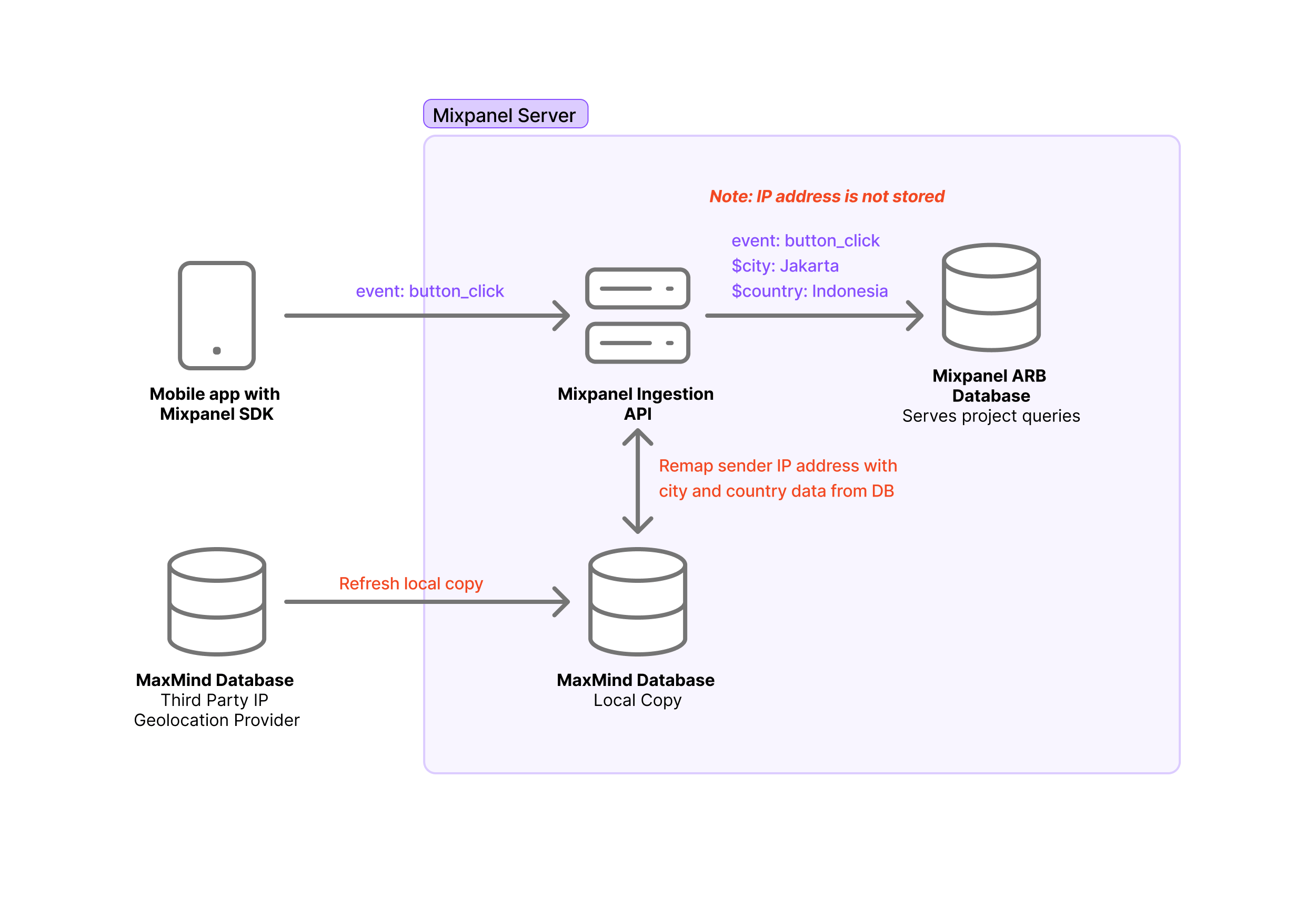
While the IP address is used to generate the geolocation properties, the IP address values themselves are not stored. Under the hood, we take the IP address of the request and parse it through Maxmind to generate the Country, Region, and City values. Afterward, these geolocation values are attached to your data, and the IP address value is discarded from the payload prior to ingestion into your project. In summary, here is the order of operations:- Our ingestion API receives a request to ingest an event or update a profile.
- We extract the IP address from the request location, then check it against Maxmind’s database.
- Maxmind returns the country, region, and city information associated with the IP address.
- The country, region, and city are attached to the event/profile payload as geolocation properties.
- The IP address value is discarded from the payload.
- The payload, which includes the geolocation properties without the IP address, enters the queue for ingestion into the project.
IP address is an approximation of location. For more granular precision, set your location using latitude and longitude.
Manual Geolocation Tracking
It is possible to override the default geolocation tracking behavior of our ingestion APIs. This is helpful in certain scenarios, for example:- Server-side implementation: Since the default geolocation is derived from the IP address of the request, data sent from the server-side will appear with geolocation set to the location of the server instead of the location of your users.
- Precise Location: IP address is an approximation of location. Some use cases require additional precision.
- Geolocation information already exists: If you have a database of your users’ locations, you may want to leverage your database as a source of truth instead of relying on the geolocation parsing mechanism.
Define Geolocation Properties
You can manually define the country, city, and region geolocation properties in your event and profile payloads. The manually defined geolocation properties will be prioritized over the location derived from the IP address. Example EventDefine Latitude and Longitude
If you have access to Latitude and Longitude information, you can specify$latitude and $longitude in the payload so that Mixpanel will use these properties (instead of the IP address) to infer the closest city.
Example Event
On events, the event properties must be named $latitude and $longitude, and the values should be in floating-point decimal degrees.
$latitude and $longitude, and the values should be in floating-point decimal degrees.
You would also need to set $latitude and $longitude outside of the $set dictionary.
You will see the $geo_source=reverse_geocoding profile property in the Profile UI if location properties were determined through $latitude and $longitude.
Reverse geocoding for user profiles is not supported via client-side SDKs.
Define IP Address
You can manually define the IP address value of your payloads and Mixpanel will parse for the geolocation using your IP address value instead of the IP address of the request location. The IP address is dropped prior to ingestion, so if you are looking to track the IP address as a property inside Mixpanel, name the property something else.Note that
ip is used for event payloads, and $ip is used for profile payloads.ip property of the events to the client’s IP address. Most server frameworks provide this out of the box.
- Django exposes this in the request object with
request.META['REMOTE_ADDR']. - Flask exposes this as
request.remote_addr. - Go exposes this as the
RemoteAddrfield on the http.Request struct. - Nginx exposes this as
$remote_addr.
Ignore IP Address
As all server-side requests originate from the same IP, such as the IP of your server, it can have the unintended effect of setting the location of all of your users to the location of your data center. To prevent the Engage API from updating your profile geolocation using the IP address of the incoming request, you can set the $ip to 0 in your payload.ip=0 to your request URL to set $ip to 0 for all your Engage requests.