

What is an MTU?
Monthly Tracked User (MTU) is a way to calculate your billing based on the number of visitors that perform a qualifying event each month, rather than individual user profiles or events. MTU plans start at $20,000 per year and are not available to be purchased directly via our Pricing page. Our sales team can consult you to choose the best option. MTU can be considered when tracking more than 100k users or 5M monthly events.MTU Calculation
An MTU is a visitor that tracks at least one qualifying event within your projects within the calendar month, independent of whether they have a user profile in Users. Mixpanel determines unique users using the$distinct_id. Users are only counted once per month, even if they perform multiple actions across devices.
An organization is charged based on the total number of MTUs across all projects. This means that if a user performs a qualifying event in multiple projects, they are counted once per project. MTUs are not User Profiles – the number of MTUs in your project will not match the number of User Profiles in your project.
MTU Guardrail
In most cases, the tally of MTUs is equal to the number of distinct IDs who have performed a tracked event this month. The only exception to this rule is if your users average more than 1,000 events each, in which case MTUs are equal to: Total number of events / 1,000Excluded Events
Certain events and API updates are non-qualifying and excluded from the MTU calculation:- Identify (
$identify) - Create Alias (
$create_alias) - Merge (
$merge) - Opt In (
$opt_in) - Session Recording Checkpoint (
$mp_session_record) - Message Sent (
$campaign_delivery) - Message Received (
$campaign_received) - Message Bounced (
$campaign_bounced) - Message Marked Spam (
$campaign_marked_spam) - Message Suppressed (
$message_suppressed) - Message Unsubscribed (
$unsubscribe) - Campaign Entered (
$journey_entered) - Experiment Started (
$experiment_started) - Mailchimp Campaign - Open
- Mailchimp Campaign - Click
- Mailchimp Campaign - Sent
- Mailchimp Campaign - Unsubscribed
- Mailchimp Campaign - Bounce
- Updates to user profiles
- Warehouse Mirror Event Updates
- Warehouse Mirror Profile Updates
Note: Mixpanel has deprecated the Messages & Experiments feature since Jan 1, 2022; the above documentation is kept for existing customers who may have had these events in the past while using those features.In addition, Mixpanel also excludes a number of inbound events sent by partner products. Refer to a given partner’s integration page to see if it has events excluded from MTU calculations.
Estimate MTU Usage
If you haven’t implemented tracking yet, you can estimate your current MTU usage by looking at your Monthly Active User (MAU) count. Your MTU and MAU counts should be similar, provided they account for anonymous visitors identically.View MTU Usage
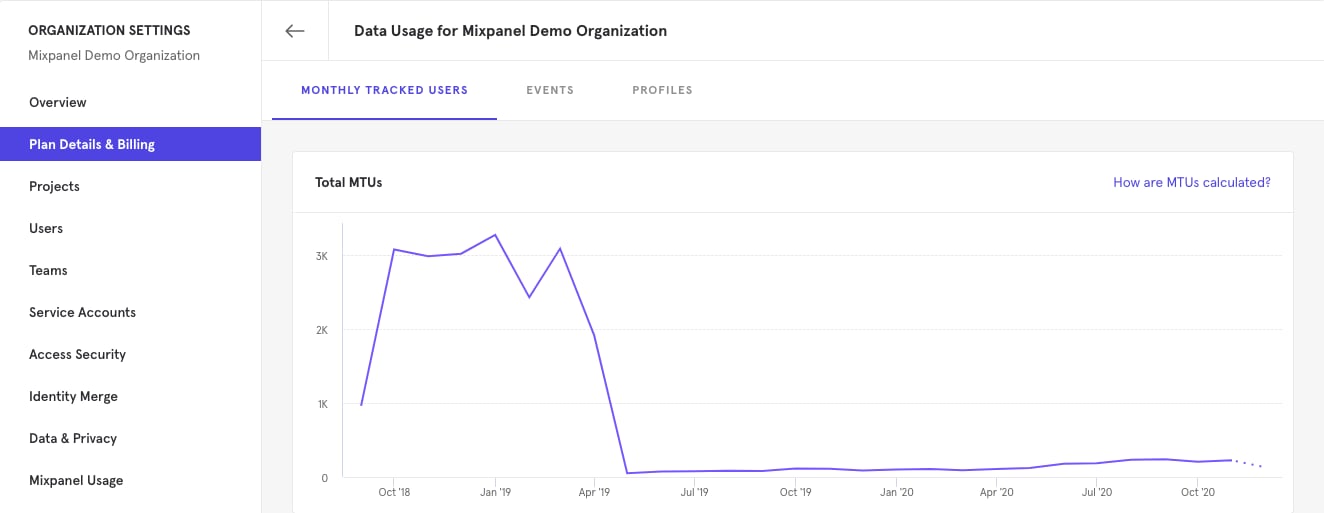
MTU calculations include anonymous visitors. This means users who only visit your homepage can still count towards MTU calculations. You can see your MTU consumption in your Organization Settings:- Click on the gear icon in the upper right corner of Mixpanel, and select “Organization Settings”
- Then click on “Plan Details & Billing” and then on “Data Usage”
What if I go over my MTU plan allowance?
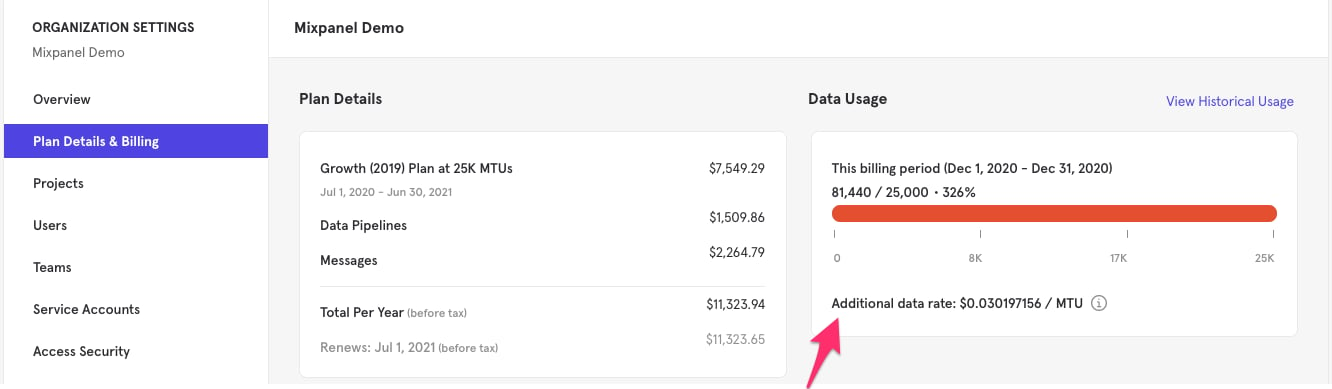
If you go over the limit of your plan, Mixpanel won’t stop collecting your data. You’ll be charged the additional data rate for each additional MTU. Automatic alerts are in place to notify Organization Owners and Billing Admins of potential additional data charges. For example, let’s say you are on a Growth plan including 1,000 MTUs:- In January you tracked 1,500 MTUs, which went over by 500 MTU.
- Around January 1, you would have paid your base monthly fee for January.
- Then around February 1, you will pay your base monthly fee for February plus the January additional data rate charges you incurred.
What caused an unexpected spike in my MTU count?
Typically, MTU counts increase when you have an increase in users in your app. The main scenarios that usually increase the number of MTUs:- A marketing campaign (can lead to an increase in tracked users due to an influx of anonymous visitors).
- An update that adds tracking to new parts of your product.