

Differences in the data models
Data Model
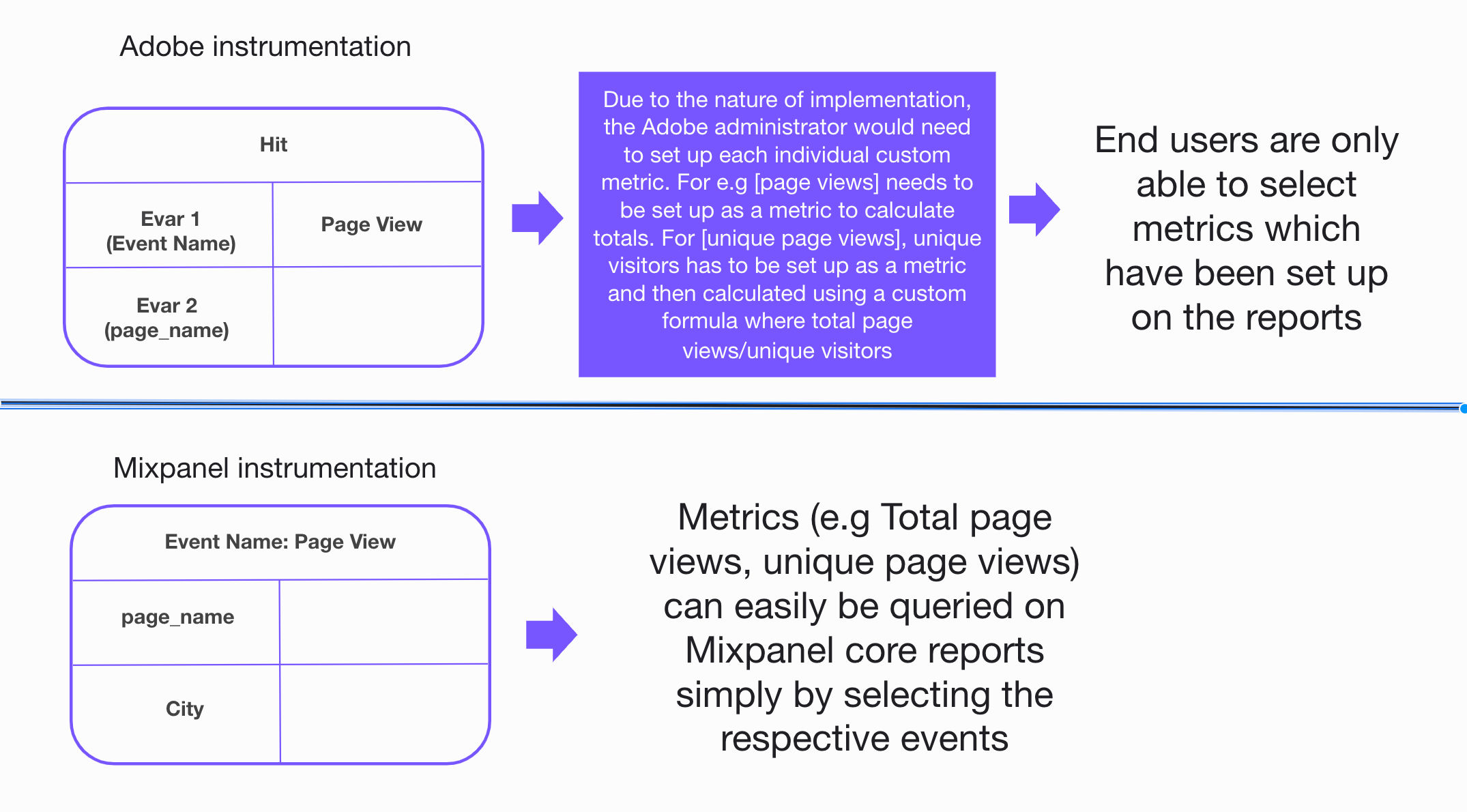
Mixpanel’s data model is based on events and properties, rather than Adobe which is schema-based with many different configurable data types. While this might be a shift if you come from the schema model where you define your data to be captured upfront before sending any data, we’ve found schema-on-read to be both more flexible and easier to set up and use.- Events capture granular user actions, like a Pageview, Signup, or Purchase.
- Properties capture attributes of those events, like which page was viewed, the UTM Campaign that led to a Signup, or the Item that was purchased.
$device_id to associate events to the same anonymous user. Once a user signs up or logs in, you’ll call .identify(<user_id>) to map users’ known user_id to their $device_id. In Adobe on the other hand, unique users are identified by the concatenation of post_visid_high and post_visid_low properties on the “hit”. Adobe will take the first ID present from in the “hit” as the official visitor ID, and then use the concatenation of post_visid_high and post_visid_low as the standard of identifying unique visitors regardless of how they were identified as a unique visitor. For example, if you are setting a custom visitor ID (included in the “vid” query parameter), that ID will be used before other IDs that might be present on that same hit.
Frequently used key metrics on Adobe and how they differ on Mixpanel
A visit: Always tied to a time period, so you know whether to count a new visit if the same user returns to your site. A visit ends when they meet any of the following criteria:- 30 minutes of inactivity: Almost all sessions end in this manner. If more than 30 minutes lapse between hits, a new visit begins.
-
12 hours of activity: If a user consistently fires image requests without any 30-minute gaps for more than 12 hours, a new visit automatically starts.
So for example, if a user visits the site for 20 hours without any 30-minutes gap:
- In Mixpanel, we will register it as 1 session
- In Adobe, this will be registered as 1 session, but 2 visits (assuming they default to the 30-minute gapped session)
- 2500 hits: If a user generates a large number of hits without starting a new session, a new visit is counted after 2500 image requests.
- 100 hits in 100 seconds: If a visit has more than 100 hits that occur in the first 100 seconds of the visit, the visit automatically ends. This behavior typically indicates bot activity, and this limitation is enforced to help increase report performance.
- Clears their cache mid-session and continues browsing your site
- Leaves your site open in a tab for longer than 30 minutes, then continues browsing
- Opens a different browser and navigates to your site on the same computer
- The same person browsing your site on different devices
- Clears their cache at any time
- Opens a different browser on the same computer. One unique visitor is counted per browser.
- The same person browsing your site on different devices. A separate unique visitor is counted per device.
- Opens a private browsing session (such as Chrome’s Incognito tab).
Track forward looking real-time data
Choose your current implementation method for Adobe Analytics and follow the below steps for starting to send live data to Mixpanel.Warehouse Connectors
Mixpanel Warehouse Connectors, allows you to natively import data from Snowflake, BigQuery or Redshift into Mixpanel. With this feature, you can set up recurring syncs from your data warehouse and ensure that Mixpanel is always in sync with your trusted data.Client-side SDKs & Server-side SDKs
You’ll have to setup Mixpanel fresh given Mixpanel leverages an event-based model that does not exist in Adobe Analytics. Depending on your current setup and how you’ve enabled data capture in Adobe, these steps will likely be as if you are starting an entirely new implementation. The rest of this guide will cover the Mixpanel JavaScript SDK for brevity, but the steps apply for any of our libraries. We recommend the following steps to get started quickly:-
Configure the Mixpanel JavaScript SDK to automatically track page views, where UTM params are tracked by default
-
Track a few key “value moment” events of interest
- Use the Mixpanel Marketing KPI Template to build your initial board
Customer Data Platforms (CDPs)
CDPs like Segment have always tracked event data and synthesized them into a specific schema format for Adobe Analytics. You can add Mixpanel as a destination to your CDP and immediately start receiving the same data as your other destinations. Since CDPs already collect all your data via 1 SDK and route to many downstream destinations, enabling Mixpanel is straightforward. Simply go to your CDP settings and add Mixpanel as a destination:
- Which events and properties to send → only send what matters
- Edit any mappings/editing/filtering that has to be done on the data → ensure high data quality and governance
- Connection settings, or CDP specific settings for data syncs → control over how data is sent
Data Warehouse
If you have your Adobe Analytics instance sitting on top of data that you collect and store in your data warehouse, getting started is simple. Instead of transforming and modeling that data to send to Adobe, you would model the data as Events and send it to Mixpanel via a Reverse ETL (RETL) tool or via directly hitting our Import API.Loading historical data
For most cases, we recommend starting fresh when migrating from Adobe Analytics. If you must import Adobe data, we strongly encourage loading historical data into a separate project as data structures, identity management, user cohort definitions, etc. are completely different in Adobe than in Mixpanel. In certain situations, retaining historical data in Mixpanel serves the purpose of enabling the team to visualize past trends. However, as this set of historical data would reside in a separate project, visualizing trends over time periods may pose challenges. For instances where historical data proves essential, we advise importing a year’s worth (or less) of historical data during the migration process. Note that backfilling historical data can have significant impact on your billing. Refer to this section for more details.Undertaking discovery: Why and what is historical data for
- Whats the purpose of bringing in historical data? It’s key to understand if you would just like a place to store historical data once Adobe is sunset or would you actually need those historical data for key metrics analysis. If its the former, the recommendation would be to send those data into a warehouse rather than Mixpanel.
- What is the time frame which you are looking at for historical data? We recommend up to 2 years worth of data and usually the cut off time to be the last month before the complete set of data flows into Mixpanel.
- Are there specific events and event properties which you would most likely query on Mixpanel? Instead of running the full load which would take a long time for the data to be available in the Mixpanel project, are there specific events and properties which are considered P0 for your team? In that case when running the script the data will be available in a much shorter period of time.
- Given the complexity of unique identifiers in Adobe (also dependent on consultants have implemented for the organization), what is the logic for the main identifier for your unique visitors.
- What is the limit to the % of discrepancies in which they are willing to accept The differences in the data model between Mixpanel and Adobe means that there will be a higher than expected discrepancy range and based on some previous projects we have done with customers. The range looks to be around 5% for most metrics.
- If you already have your historical data in a warehouse,
- Utilize our warehouse connector, to send historical data into a separate Mixpanel project
- If you have a CDP, this should be straightforward
- Utilize the CDPs backfilling feature, like Segment Replay, to re-send historical data to Mixpanel
- For any other implementation method
- First, export your data to the data warehouse so you have a record of Adobe Analytics
- Once exported, your data warehouse tables can be transformed and modeled into the event format Mixpanel expects
- Leverage our Import API to send us the formatted events from your data warehouse