

Overview
Lookup Tables let you enrich your Mixpanel properties (event properties or user profile properties) with additional attributes or metadata about these properties. This is done by uploading a CSV containing a join key column and additional property columns, then mapping a Mixpanel property the join key.- If you have a database background, lookup tables are like dimension tables or join tables.
- If you have an Excel / Google Sheets background, Lookup Tables are like VLOOKUP.
Song Played event, which contains a song_id property.
You want to filter and breakdown this event by other attributes of the song, like
artist and genre, which are not tracked as properties. Lookup Tables let you upload a CSV of data about songs like the table below and map it to the song_id property:
Then, whenever you use an event with the
song_id property, you’ll have access to all these other properties of the song as well. Under the hood, Mixpanel joins the two tables like so:
The benefit is that you don’t need to change your tracking code at all. You can upload this Lookup Table after the fact and it automatically joins onto all prior events or user profiles with the mapped property.
We also provide an API and Warehouse Connectors to keep Lookup Tables synced on a recurring basis.
Use Cases
Media One possible use case for Lookup Tables is to load metadata about your content (songs, podcasts, articles) into Mixpanel. If you track some content identifier (eg: song_id, podcast_id, article_id) as a property on your events, you can then upload a Lookup Table with other properties of that content, like name, category, author, or creation date. You can then use any of those properties on any events that have the ID properties. E-Commerce If you sell products online, you can load your product catalog into Mixpanel as a Lookup Table. As long as you track a product_id or sku_id property on your events, you’ll be able to enrich those events with other properties about those products, like their name, category, and price. B2B If you have a B2B product, you likely have some key entities that are specific to your product. For example, Github has repositories, Figma has design components, Slack has channels. If they track repository_id, component_id, or channel_id as properties on their events, they can use Lookup Tables to enrich those events with information about those repositories, components, and channels. In general, it is still best to have metadata that don’t change over time, and you analyze often, to be tracked as event or user properties. Do refer to the FAQ section on When shouldn’t I use Lookup Tables?Create a Lookup Table
A Lookup Table CSV must contain at least 2 columns; a join key column and one or more Lookup Table property columns. The first row is the header and will serve as names for the Lookup Table properties for each column. Header names must be unique. The CSV must be valid according to RFC4180. See our API reference for more specific details about how we parse CSVs. ExampleJoin Key Column
The first column is reserved for the join key used to map to the property you choose. Each value in this column must be unique with no duplicates with no falsy values. The first row column header is unimportant since it is reserved for the join key and can be any text as long as it is unique to all other column headers in the CSV.If your join key is a large numeric ID, track the mapped event or user property
as a string. Numeric values above 2^53 (9,007,199,254,740,992) lose precision when
ingested, so the stored value no longer matches the key. The lookup table CSV key
is always stored exactly as written, so only the mapped property needs to change.
See Numeric data type.
Lookup Table Property Column
Lookup Tables property values do not support Objects and List of Objects data types.
Upload a Lookup Table
Free plan users can upload and map a Lookup Table to an existing property locally from within a report. Growth and Enterprise plan users can also create globally persistent mappings to a Lookup Table via the Lexicon. See our pricing page for more details.
Globally using Lexicon
Lookup Tables that are uploaded globally via the Lexicon can be accessed by other project users when they build reports.1
Upload your Lookup Table CSV
Navigate to Lexicon, select Lookup Tables from the left-hand sidebar, then click “Import Lookup Table” to upload a CSV file or manage existing Lookup Tables.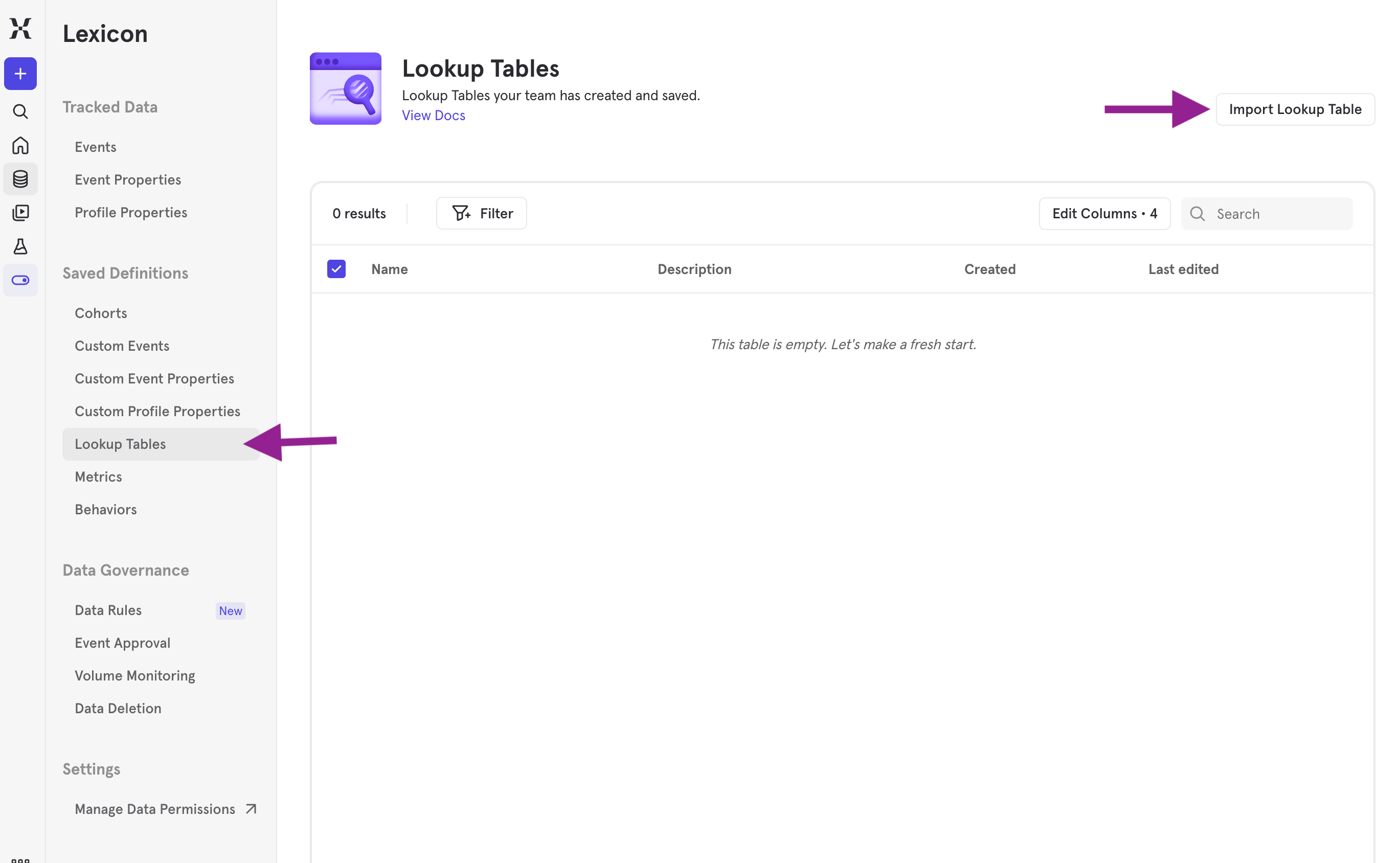
2
Map the Lookup Table to an event or user profile property
Once you have uploaded the CSV file for the Lookup Table, map it to an event or user profile property, which is the ID (e.g. song_id) that the Lookup Table join key will map to. Mixpanel will assume the first column of the CSV is the ID and will join it with that property.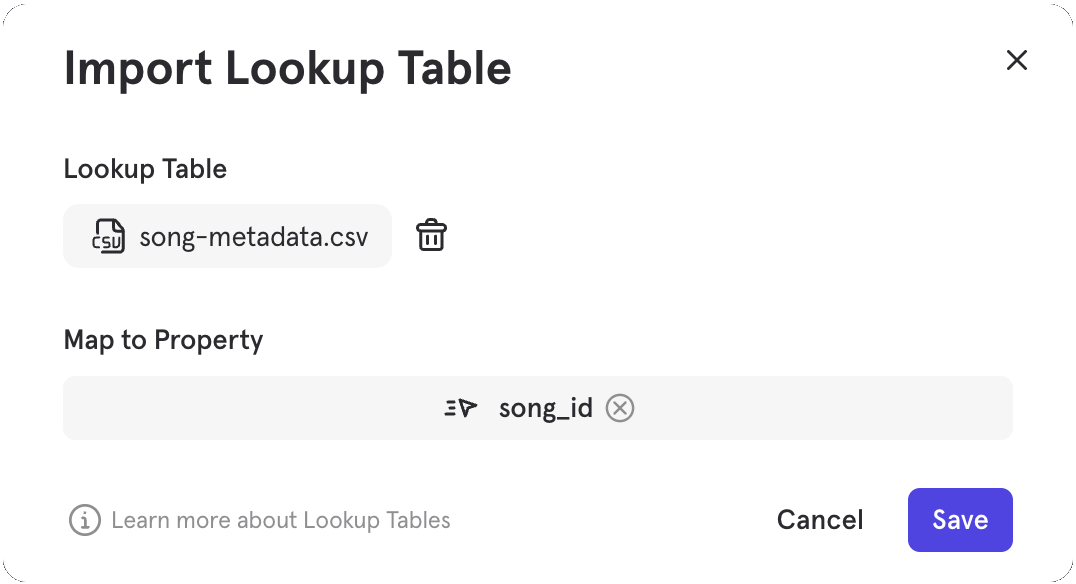
Multiple Mappings
A single Mixpanel property can only be mapped to one Lookup Table at a time in the Lexicon. For example, if you have a “first_location” property and it is already mapped to a “City” Lookup Table, it cannot be simultaneously mapped to a “Country” Lookup Table. If you need to map multiple Lookup Tables to a single Mixpanel property for your use case, we recommend one of the two approaches below:- Locally map your Lookup Table to the property within the report. This option allows you to have multiple local Lookup Tables across different reports, where their context and usage are only relevant to these reports.
- Create multiple Custom Properties that contain the property you want to map to without any functions, then map the different Lookup Tables to each custom property in Lexicon. Since the output of these Custom Properties without functions would be identical to the property itself, the mapping will also be identical and globally accessible via the Custom Properties.
Locally within a Report
You can also upload Lookup Tables straight from your reports. Lookup Tables uploaded directly in reports create a local mapping that can only be used while you are in the report. This mapping is not global, and can’t be used in other reports. This feature can be useful if you need to have the Lookup Table mapping only for a specific report or if you wish to override an existing globally mapped lookup table for a property within a report.1
Click the "..." button next to the breakdown property from your report and choose "Map Lookup Table"
This breakdown property will be used as the ID that the Lookup Table join key will map to.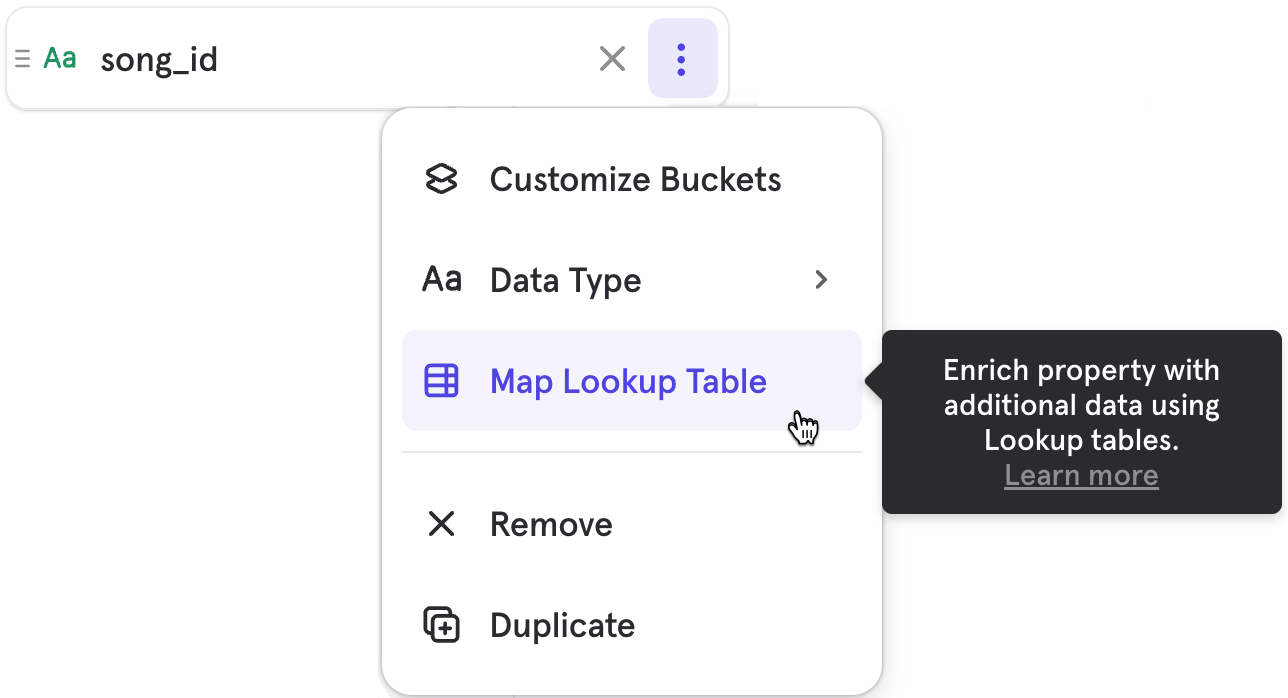
2
Select a Lookup Table to map to the breakdown property
Alternatively, you may upload a new Lookup Table CSV for use locally in the report.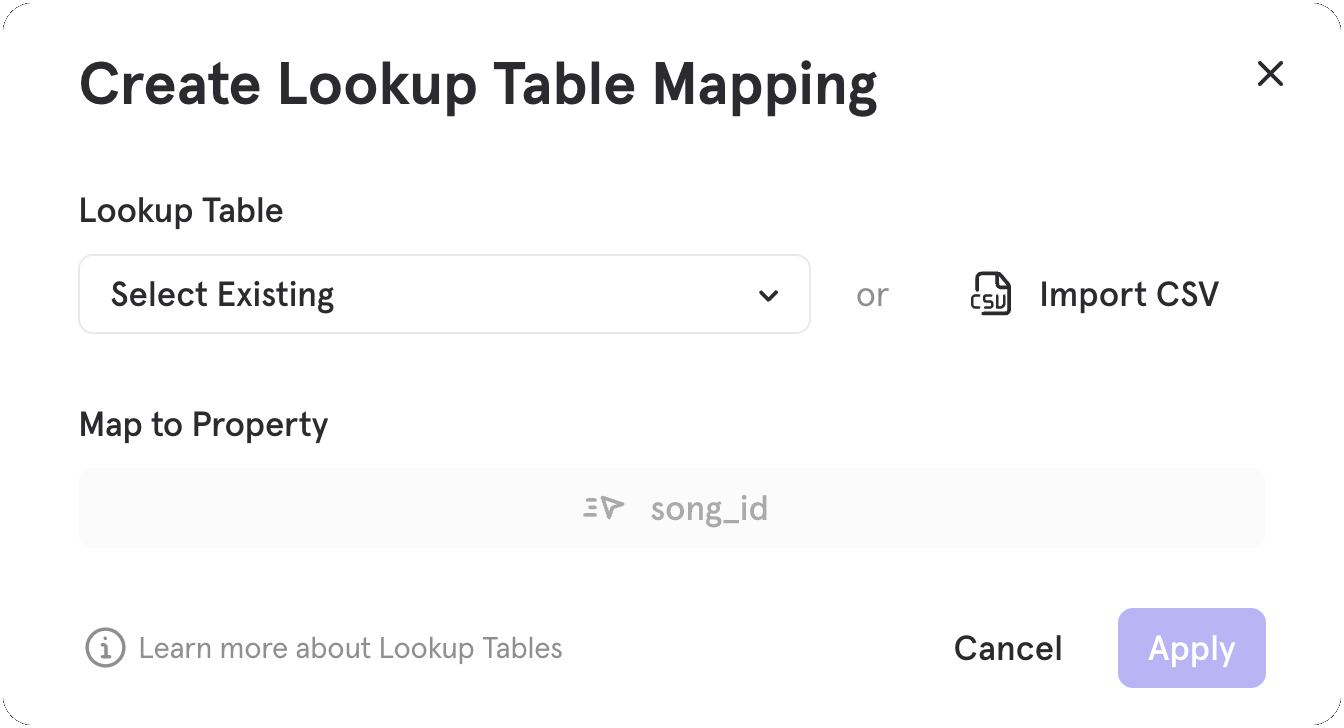
Use a Lookup Table
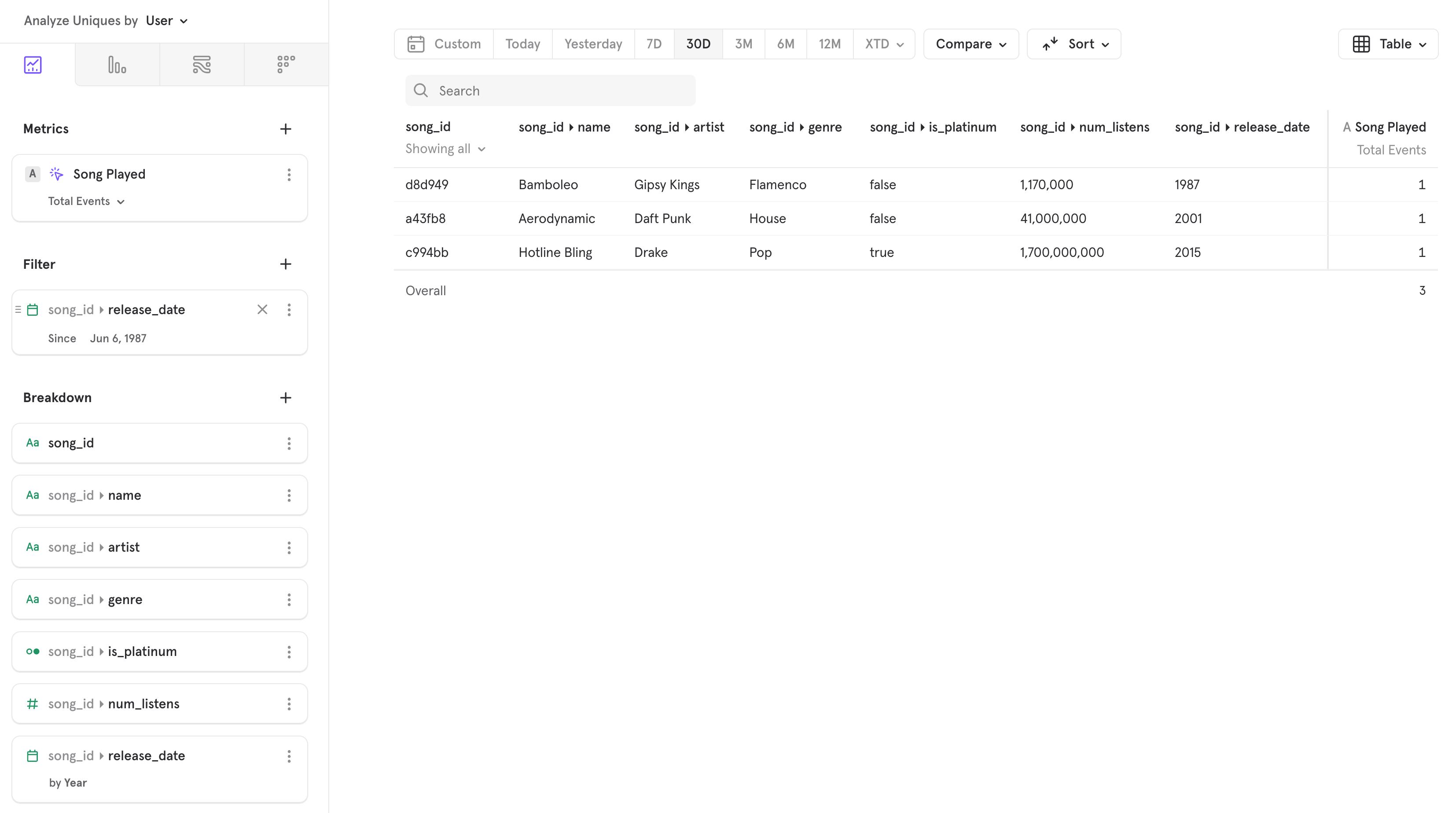
Once a Lookup Table is mapped, you can access if by clicking on the mapped property and it will expand the columns from the Lookup Table as if they are nested properties. Lookup Table property names are derived from the header (1st row) in the CSV; these labels cannot be renamed (i.e. using a Lexicon Display Name) within the Mixpanel UI.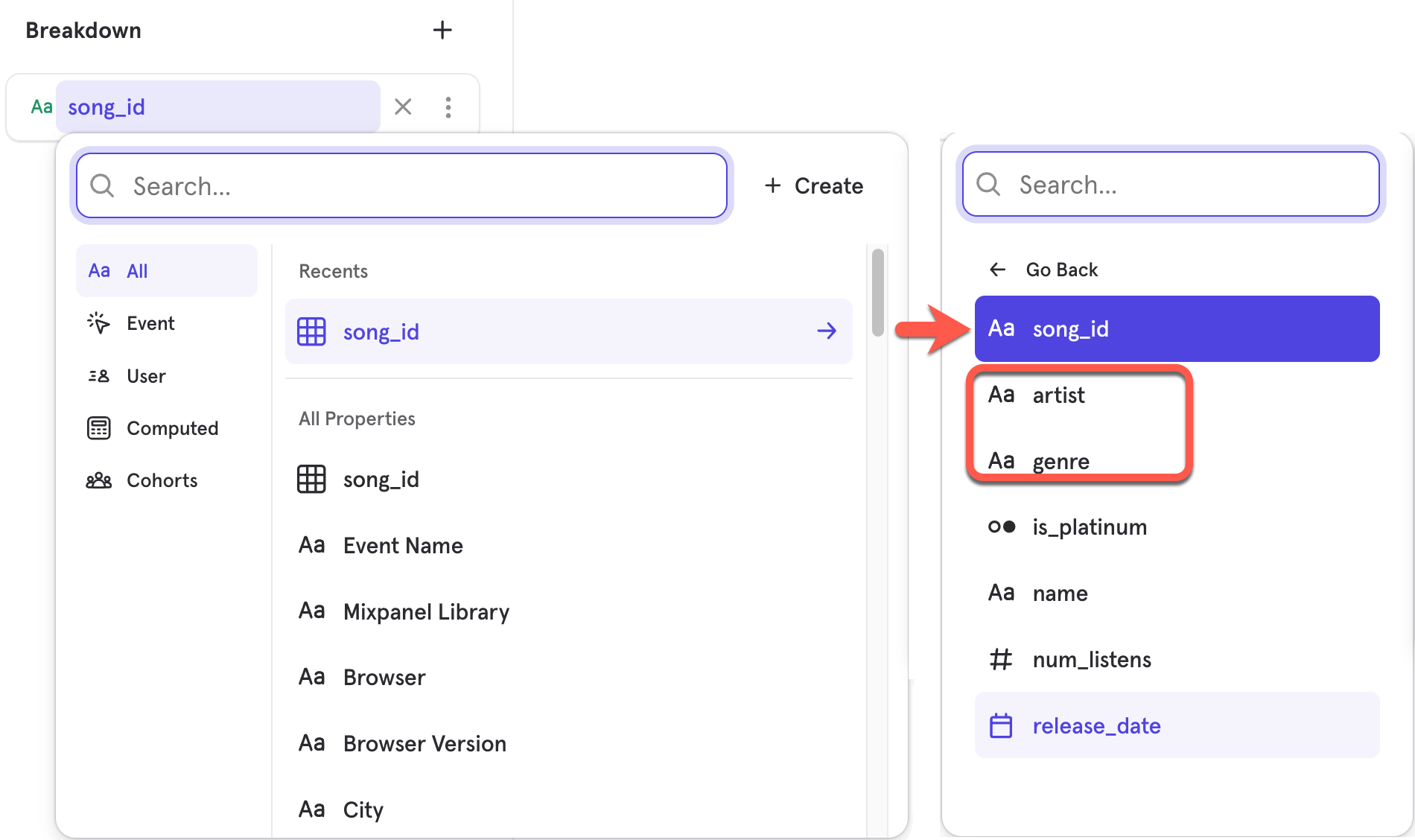
Limits
- Lookup Tables have a limit of 100MB per CSV file or roughly 1M rows.
- You can use multiple lookup tables in your projects, but the total count of rows has to be less than 5 million rows across all uploaded CSVs.
- Lookup Tables does not support Objects or List of Objects data types.
FAQ
When should I use Lookup Tables?
A good use case for Lookup Tables are for mapping metadata that changes over time, since lookup tables can be replaced via the Mixpanel UI or programatically via API or Warehouse Connectors, and changes are retroactive. A currency exchange rate table mapped toOrder Currency property which can be used to convert Order Amount; or a region territory grouping table mapped to Country are good examples.
When shouldn’t I use Lookup Tables?
We don’t recommend using Lookup Tables for anything with very high cardinality IDs. For properties with high cardinal IDs, we recommend that you track the metadata as event properties.- Don’t use Lookup Tables when the ID is a User ID. Instead use User Profiles. Mixpanel is more optimized for User Profiles, so they don’t have any scale limits and support more opinionated workflows in our product (like clicking into a report and seeing the list of User Profiles).
- Don’t use Lookup Tables as a way to mutate events. For example, it might be tempting to have an Orders lookup table, with 1 row per Order that a customer makes. Then, you can update the Orders table whenever an order is mutated (eg: when you issue a refund). This approach will quickly run into the 100MB scale limit and will make it difficult to do the analysis you need. Instead, we recommend modeling state changes as events, which doesn’t have scale limits and preserves the history of state changes. Track an
Order Completedevent and anOrder RefundedorOrder Modifiedevent. You can then use our funnels report to answer questions like: “what % of orders were refunded?”
Who has access?
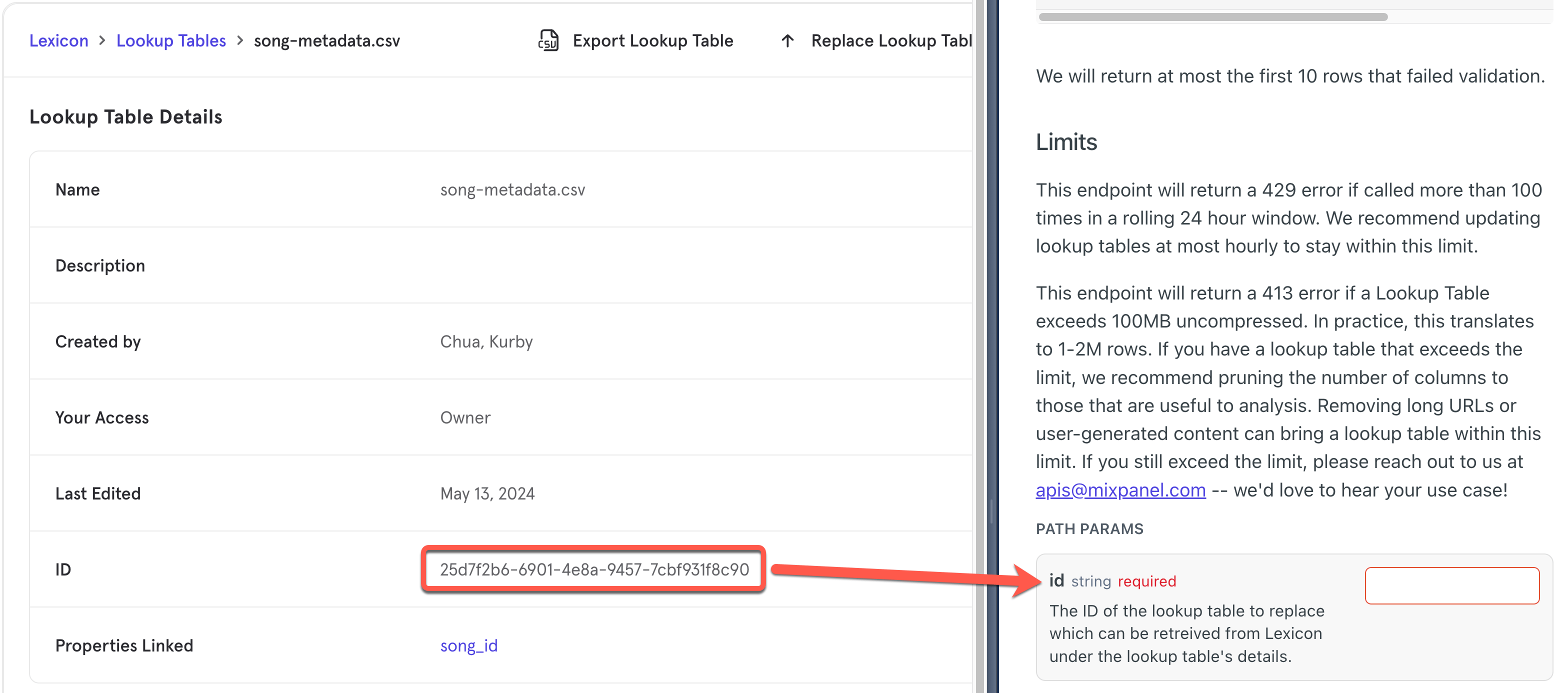
All users will be able to upload and map a Lookup Table to an existing property locally from within a report. Only users with “Admin” or “Owner” roles will be able to make the mapping persistent in Lexicon globally for other users in the project to use. Project Owners can delete any Lookup Table in a project while Admins can only delete their own. Consumers and Analysts cannot delete lookup tables even if they own them. Customers on the Free plan will be able to locally map a property to a Lookup Table, but not have the option of persisting the mapping.Where can I find the “id” of the lookup table for API’s Path Params?
When replacing a lookup table using the API, you would need to pass the lookup table’s ID as part of the URL in the API call. Thisid can be found in Lexicon under the Lookup Table’s Details. See below screenshot as example:
Can I map it to the $distinct_id property?
Mapping a Lookup Table to the$distinct_id property is not supported. To create a user property for a profile, upload it as a user property directly.