> ## Documentation Index
> Fetch the complete documentation index at: https://docs.mixpanel.com/llms.txt
> Use this file to discover all available pages before exploring further.
# Choosing the Right Method
If you use our SDKs, there are two general approaches to track events: client-side and server-side. The approach you choose has implications on the quality and comprehensiveness of your data.
We recommend tracking everything you possibly can via your servers, and only supplementing that with client-side tracking when necessary.
Note: If you already track events via a CDP, Tag Manager, or via your DWH using something like Snowplow, you can route those events to Mixpanel with our native integrations. See the [Segment](https://segment.com/docs/connections/destinations/catalog/actions-mixpanel/), [Rudderstack](https://rudderstack.com/integration/mixpanel/), or [GTM](https://github.com/mixpanel/mixpanel-gtm-template#readme) docs for a walkthrough. We can also load data directly from data warehouses like [Snowflake](/docs/data-pipelines/integrations/snowflake) and [BigQuery](/docs/data-pipelines/integrations/bigquery).
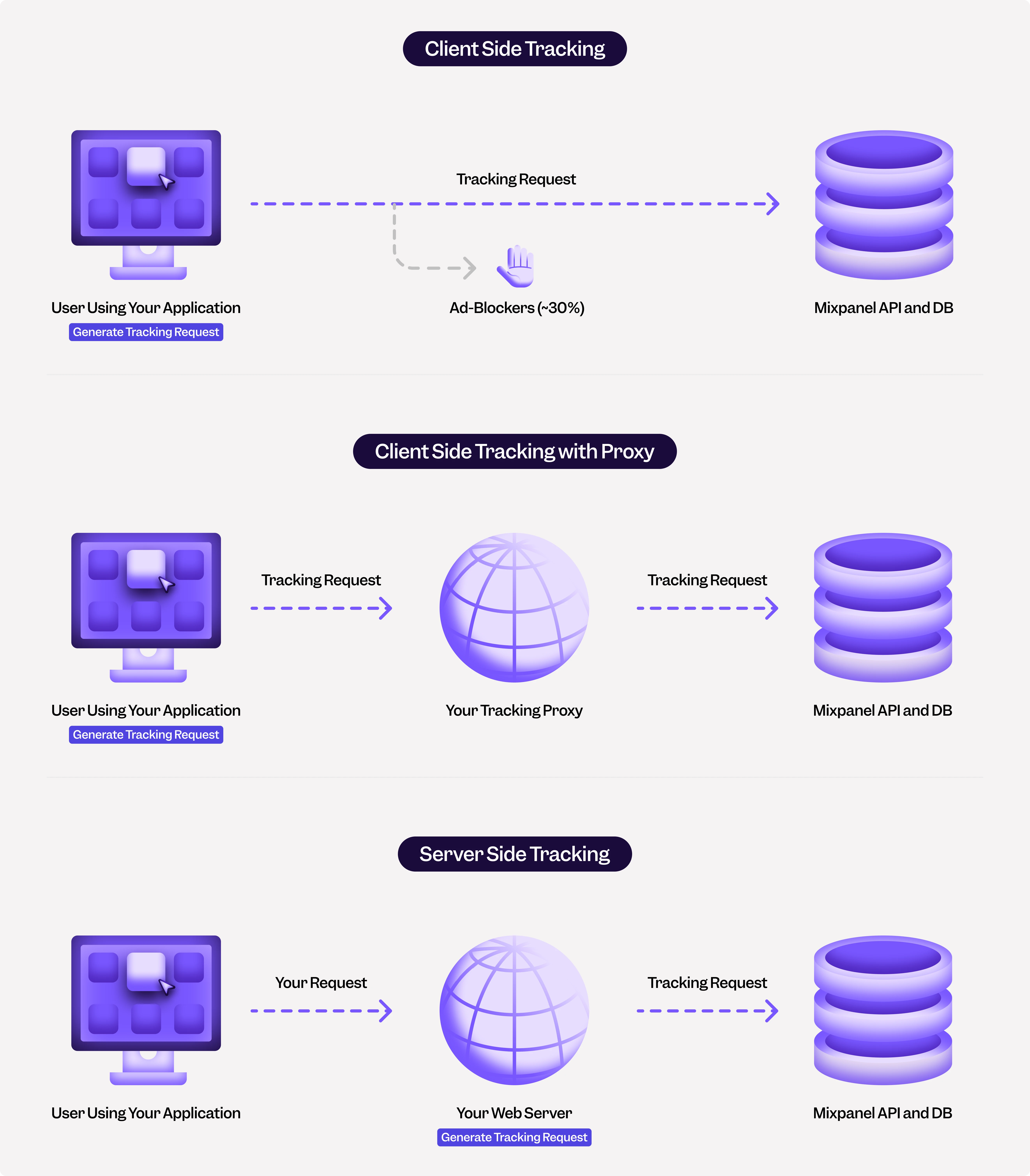 ## Server-Side Tracking
In this method, you send events from your servers to Mixpanel. For example, when a user loads a web page, a request is made to your web application server. In the code that handles the request, you can create a "Page Loaded" event and send it to Mixpanel. You can use one of our server SDKs (eg: Python) or send events to our [HTTP API](/reference/track-event) directly. Please see [this article](/docs/best-practices/server-side-best-practices) on best practices for server-side tracking.
**Pros**
* Reliable, not susceptible to ad-blockers
* Data is consistent across platforms
* Easier to fix integration mistakes quickly
**Cons**
* Harder to track user interactions that only happen on the client
* Requires some custom code to track anonymous (non-logged in) users across requests
**Server-Side SDKs**
* [Python](/docs/tracking-methods/sdks/python)
* [Node.js](/docs/tracking-methods/sdks/nodejs)
* [PHP](/docs/tracking-methods/sdks/php)
* [Go](/docs/tracking-methods/sdks/go)
* [Java](/docs/tracking-methods/sdks/java)
## Client-Side Tracking
In this method, events are generated on the client device and sent to the Mixpanel API. There are two types of client-side tracking: web (Javascript) and mobile.
**Pros**
* Easy to track client-side actions and state
* Easy to track anonymous (non-logged in) user data
**Cons**
* Unreliable, due to ad-blockers. You may lose events for 30-50% of your users. You can resolve this by sending events through a proxy, but it requires a bit more effort
* Difficult to keep metrics consistent across web, iOS, and Android since each requires its own tracking
* Difficult to fix integration mistakes quickly (particularly on mobile applications)
* Tracking will diverge over time due to old mobile clients
**Client-Side SDKs**
* [Javascript](/docs/tracking-methods/sdks/javascript)
* [React Native](/docs/tracking-methods/sdks/react-native)
* [Android](/docs/tracking-methods/sdks/android)
* [Objective C](/docs/tracking-methods/sdks/ios)
* [Swift](/docs/tracking-methods/sdks/swift)
* [Flutter](/docs/tracking-methods/sdks/flutter)
* [Unity](/docs/tracking-methods/sdks/unity)
> Note: Mixpanel client-side SDK uses [/track API endpoint](/reference/track-event#limits) which by default only ingests events in the last 5 days.
### Client-Side Tracking via a Proxy
A proxy is helpful in a client-side web setting to [reduce the likelihood of ad-blockers impacting your tracking](https://www.youtube.com/watch?v=8Pv6tmRfqr8). Please see [this article](/docs/tracking-methods/sdks/javascript#tracking-via-proxy) on how to set up a proxy.
## Server-Side Tracking
In this method, you send events from your servers to Mixpanel. For example, when a user loads a web page, a request is made to your web application server. In the code that handles the request, you can create a "Page Loaded" event and send it to Mixpanel. You can use one of our server SDKs (eg: Python) or send events to our [HTTP API](/reference/track-event) directly. Please see [this article](/docs/best-practices/server-side-best-practices) on best practices for server-side tracking.
**Pros**
* Reliable, not susceptible to ad-blockers
* Data is consistent across platforms
* Easier to fix integration mistakes quickly
**Cons**
* Harder to track user interactions that only happen on the client
* Requires some custom code to track anonymous (non-logged in) users across requests
**Server-Side SDKs**
* [Python](/docs/tracking-methods/sdks/python)
* [Node.js](/docs/tracking-methods/sdks/nodejs)
* [PHP](/docs/tracking-methods/sdks/php)
* [Go](/docs/tracking-methods/sdks/go)
* [Java](/docs/tracking-methods/sdks/java)
## Client-Side Tracking
In this method, events are generated on the client device and sent to the Mixpanel API. There are two types of client-side tracking: web (Javascript) and mobile.
**Pros**
* Easy to track client-side actions and state
* Easy to track anonymous (non-logged in) user data
**Cons**
* Unreliable, due to ad-blockers. You may lose events for 30-50% of your users. You can resolve this by sending events through a proxy, but it requires a bit more effort
* Difficult to keep metrics consistent across web, iOS, and Android since each requires its own tracking
* Difficult to fix integration mistakes quickly (particularly on mobile applications)
* Tracking will diverge over time due to old mobile clients
**Client-Side SDKs**
* [Javascript](/docs/tracking-methods/sdks/javascript)
* [React Native](/docs/tracking-methods/sdks/react-native)
* [Android](/docs/tracking-methods/sdks/android)
* [Objective C](/docs/tracking-methods/sdks/ios)
* [Swift](/docs/tracking-methods/sdks/swift)
* [Flutter](/docs/tracking-methods/sdks/flutter)
* [Unity](/docs/tracking-methods/sdks/unity)
> Note: Mixpanel client-side SDK uses [/track API endpoint](/reference/track-event#limits) which by default only ingests events in the last 5 days.
### Client-Side Tracking via a Proxy
A proxy is helpful in a client-side web setting to [reduce the likelihood of ad-blockers impacting your tracking](https://www.youtube.com/watch?v=8Pv6tmRfqr8). Please see [this article](/docs/tracking-methods/sdks/javascript#tracking-via-proxy) on how to set up a proxy.