> ## Documentation Index
> Fetch the complete documentation index at: https://docs.mixpanel.com/llms.txt
> Use this file to discover all available pages before exploring further.
# Iterable
## Overview
Export Mixpanel cohorts to Iterable to create user lists that you can target in your Iterable campaigns. Manage the Iterable integration from the Mixpanel integrations page.
## Permissions
You must be a Mixpanel project admin to use the Iterable data integration.
## Enable the Integration
1. Navigate to **Settings** in the bottom left, then select **Integrations**.
2. From the Integrations page, select the Insider dropdown, and select **Connect**.
3. The Iterable integration page will show a green export icon and details about the integration after it is connected.
If you select the US or EU Iterable data center, data will be sent to the corresponding Iterable project. Note: Every Iterable API key is associated with a specific Iterable project, which means that it's also associated with a specific data center. Further reading: [https://support.iterable.com/hc/en-us/articles/360043464871-API-Keys#api-keys-projects-and-data-centers](https://support.iterable.com/hc/en-us/articles/360043464871-API-Keys#api-keys-projects-and-data-centers)
To disable the connector, select the Iterable dropdown and click **Disconnect**.
## Export a Cohort
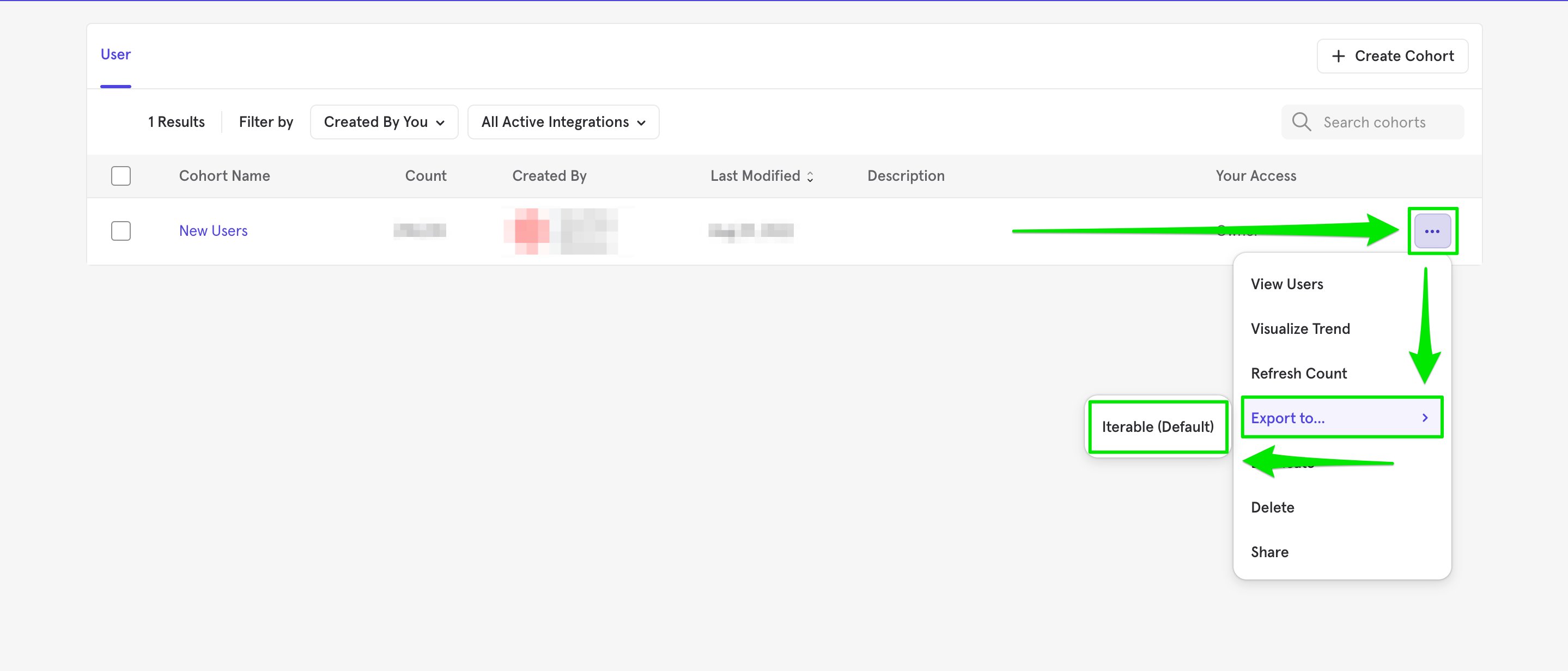
1. Navigate to **Lexicon**, then select the **Cohorts** tab to view all of your cohorts.
2. Select the cohort that you want to export. Click on the three-dot icon on the right side of the cohort.
3. Click Export to > Iterable. Select either one-time sync or dynamic sync. Click **Start Sync**.
 ## Sync Types
This integration supports two types of exports: one-time export and dynamic sync. When you generate a one-time export or dynamic sync, it overwrites the previous export with an updated export that reflects users who qualify for the cohort at the time of export.
### One-Time Export
In a one-time export, Mixpanel sends Iterable a static export of users who currently qualify for the cohort. The cohort data will not be updated in Iterable after a one-time export.
### Dynamic Sync
In dynamic sync, Mixpanel initiates sync between a cohort and Iterable every fifteen minutes. The exported cohort will be updated every fifteen minutes to reflect the most recent list of users in a cohort.
## Select the Cohort in Iterable
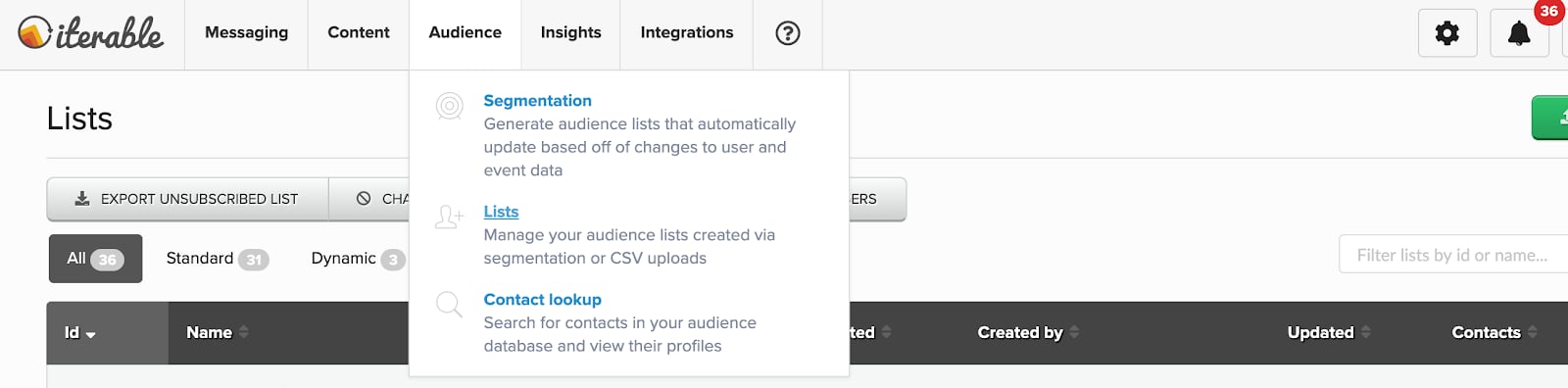
You must log in to Iterable to use the Mixpanel Cohorts to send campaigns.
The Mixpanel Cohort is available in the Audience list. Mixpanel exports cohort data as `mixpanel__`.
## Sync Types
This integration supports two types of exports: one-time export and dynamic sync. When you generate a one-time export or dynamic sync, it overwrites the previous export with an updated export that reflects users who qualify for the cohort at the time of export.
### One-Time Export
In a one-time export, Mixpanel sends Iterable a static export of users who currently qualify for the cohort. The cohort data will not be updated in Iterable after a one-time export.
### Dynamic Sync
In dynamic sync, Mixpanel initiates sync between a cohort and Iterable every fifteen minutes. The exported cohort will be updated every fifteen minutes to reflect the most recent list of users in a cohort.
## Select the Cohort in Iterable
You must log in to Iterable to use the Mixpanel Cohorts to send campaigns.
The Mixpanel Cohort is available in the Audience list. Mixpanel exports cohort data as `mixpanel__`.
 ## Matching Users between Mixpanel and Iterable
> **Warning:** Projects using the [simplified ID merge system](/docs/tracking-methods/id-management#identity-merge-apis) must have the `$user_id` in Mixpanel match the user identifier in the partner service. Using any alternative partner properties to match users between tools may result in partner events not being attributed to the correct user in Mixpanel. Any partner properties mentioned in the below section are primarily applicable to projects on the original ID merge system.
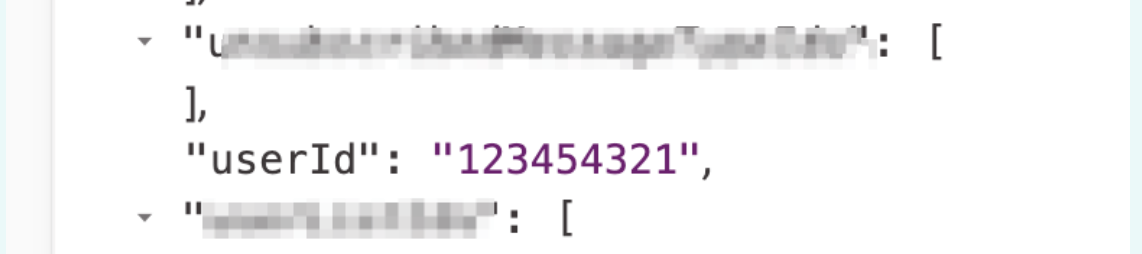
The best way to match users from Mixpanel to Iterable is to grab the value displayed as `userId` in Iterable and store it as a profile property for the user in Mixpanel under the name `$iterable_user_id`. This also prevents Iterable from overwriting the Iterable User ID with the Mixpanel Distinct ID upon cohort sync from Mixpanel. For context, the value you should store as `$iterable_user_id` in the Mixpanel profile would look like this in Iterable:
## Matching Users between Mixpanel and Iterable
> **Warning:** Projects using the [simplified ID merge system](/docs/tracking-methods/id-management#identity-merge-apis) must have the `$user_id` in Mixpanel match the user identifier in the partner service. Using any alternative partner properties to match users between tools may result in partner events not being attributed to the correct user in Mixpanel. Any partner properties mentioned in the below section are primarily applicable to projects on the original ID merge system.
The best way to match users from Mixpanel to Iterable is to grab the value displayed as `userId` in Iterable and store it as a profile property for the user in Mixpanel under the name `$iterable_user_id`. This also prevents Iterable from overwriting the Iterable User ID with the Mixpanel Distinct ID upon cohort sync from Mixpanel. For context, the value you should store as `$iterable_user_id` in the Mixpanel profile would look like this in Iterable:
 Iterable uses an email address to match users from the cohort with users from their system. The integration will fail if an email address is not sent. In order to use this integration, you must set email as a user profile property.
## Iterable Events into Mixpanel and MTU Exemptions
Iterable offers the ability to send events from Iterable to Mixpanel to perform deeper analysis based on messaging data. For detailed instructions, please refer to [Iterable's integration documentation](https://support.iterable.com/hc/en-us/articles/208013936-System-Webhooks-).
Events coming from Iterable are marked with the property "\$source" to denote the source product.
Mixpanel will exempt certain messaging outreach events from MTU calculations, meaning you're free to send campaigns to dormant users without them counting towards MTU billing (only once a user engages with a message will they then be counted towards that tally).
The following events are exempt from MTU calculations:
* emailSend
* emailBounce
* emailComplaint
* emailSendSkip
* emailSubscribe
* emailUnSubscribe
* hostedUnsubscribeClick
* inAppSend
* inAppSendSkip
* pushBounce
* pushSend
* pushSendSkip
* smsBounce
* smsReceived
* smsSend
* smsSendSkip
* webPushSendSkip
Iterable uses an email address to match users from the cohort with users from their system. The integration will fail if an email address is not sent. In order to use this integration, you must set email as a user profile property.
## Iterable Events into Mixpanel and MTU Exemptions
Iterable offers the ability to send events from Iterable to Mixpanel to perform deeper analysis based on messaging data. For detailed instructions, please refer to [Iterable's integration documentation](https://support.iterable.com/hc/en-us/articles/208013936-System-Webhooks-).
Events coming from Iterable are marked with the property "\$source" to denote the source product.
Mixpanel will exempt certain messaging outreach events from MTU calculations, meaning you're free to send campaigns to dormant users without them counting towards MTU billing (only once a user engages with a message will they then be counted towards that tally).
The following events are exempt from MTU calculations:
* emailSend
* emailBounce
* emailComplaint
* emailSendSkip
* emailSubscribe
* emailUnSubscribe
* hostedUnsubscribeClick
* inAppSend
* inAppSendSkip
* pushBounce
* pushSend
* pushSendSkip
* smsBounce
* smsReceived
* smsSend
* smsSendSkip
* webPushSendSkip